Posts

Comparing Facebook and Google+ Login Integration for Android Apps

Recently, I had the opportunity to implement Facebook and Google+ login functionalities into an Android application. I decided to write a brief comparison of the two integration processes using Facebook SDK v4.3 and Google Play Services v4.3.23. Google+ Server-Side Setup : Requires creating a new app on the Google Developers Console. Android Manifest : You need to add the generated API key into the Android manifest file. Implementation : Involves a few methods. Your activity needs to implement ConnectionCallbacks and OnConnectionFailedListener . Facebook Server-Side Setup : Also requires creating a new app on the Facebook Developers site. Android Manifest : You need to add the generated API key to the Android manifest and declare one activity. SDK Compatibility : The SDK is not compatible with Eclipse directly; however, there are workarounds available on Stack Overflow. XML Customization : Customizing the Facebook button in XML requires overwriting styles in the Facebook SDK, which is...
Thermal Printer Perl Library

Image
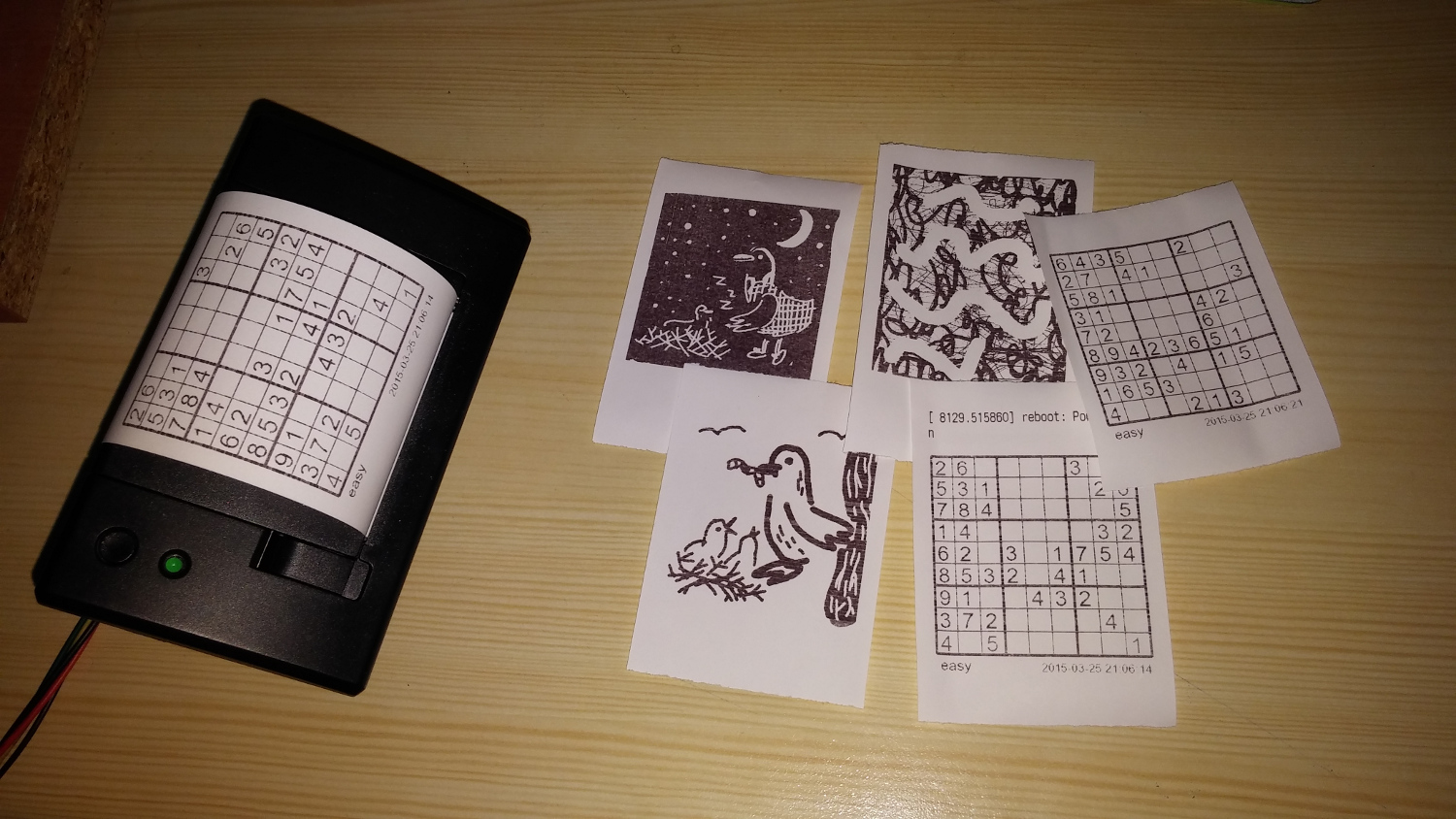
What Last month, I developed a web GUI for my Raspberry Pi thermal printer. Despite extensive testing, I struggled with some fundamental tasks, such as printing text with diacritics and creating custom characters. Existing libraries were available in Python and C, but Perl options were limited and often lacked the methods I needed. This prompted me to create my own Perl library for the Adafruit thermal printer. What I Did I created a Perl library for the Adafruit thermal printer by thoroughly reviewing the printer's documentation and implementing methods for nearly every command mentioned. The library includes standard functionalities for altering fonts, generating barcodes, and printing images. Additionally, I added some custom features: Printing Images with Gradient Effects : This feature allows you to print images with a gradient effect, enhancing visual appeal. Aligning Images : If an image is narrower than the printing paper, this method adjusts its alignment. Registering Cust...

Connecting a Thermal Printer to a Raspberry Pi B+ with a Server-Side GUI

Image
What is a Thermal Printer? Thermal printers are commonly used for printing receipts in stores. They operate using special thermal paper that reacts to heat, allowing the printer to create images or text without needing ink. These printers are widely available for purchase online. When connecting a thermal printer to a Raspberry Pi, it's crucial to use an adapter with the correct amperage; otherwise, you may encounter issues like faded prints or no output at all. What I Did I successfully connected a thermal printer to a Raspberry Pi and configured it to periodically request new content from a server. I utilized a Python library to print images, barcodes, and formatted text. To make the printer more versatile, I developed a web-based GUI that allows users to create content for the printer. The features include formatted text input, a basic canvas for drawing, and a Sudoku generator with adjustable difficulty levels.      

Using the LG G3 Circle Case SDK to Create a Demo Application

Image
What is the Circle Case? LG offers a unique accessory for its G3 model—a special case with several advanced features. This case supports NFC technology, wireless charging via the Qi standard (available in the European market), and includes a circular cutout on the front cover. This circular window allows users to interact with about one-third of the display using a customized GUI, providing quick access to certain apps and functions. LG G3 SDK To help developers leverage the circle case's features, LG released a lightweight SDK. The core functionality revolves around detecting the opening and closing of the case using a hidden magnet within the case and a sensor behind the screen. The SDK provides a broadcast receiver to capture these events. Here's a basic example of how you can use this in your app: public class QCircleActivity extends Activity { // [START]declared in LGIntent.java of LG Framework public static final int EXTRA_ACCESSORY_COVER_OPENED = 0; public s...

Controlling an Owi Robotic Arm with Raspberry Pi Using Keyboard, WebSockets, and OpenCV

Image
How It All Started I recently received a Raspberry Pi (Model B+) as a gift for my 27th birthday. Naturally, the first thing I did was explore the GPIO (General Purpose Input/Output) pins that can be programmed. I quickly discovered the RPi.GPIO Python library, which supports GPIO manipulation, and I began experimenting with some basic circuits—toggling LEDs, working with an RGB LED, generating speaker beeps, and more. A few months earlier, a colleague had shown me a webpage featuring robotic arms that caught my attention. The closest retailer selling robotic arms was in the Czech Republic, and they only had one model available—the Owi robotic arm. So, I decided to get it and combine it with my Raspberry Pi. Connecting the Owi Arm to the Raspberry Pi The first challenge was connecting the Owi robotic arm to the Raspberry Pi. The model I purchased came with a joystick controller, so I had to figure out how to connect it to the Raspberry Pi. After a few hours of searching, I found a video...

Generating a Heat Map Using iBeacons with an Android Application

Image
Introduction About a month ago, I had the opportunity to experiment with iBeacons on the Android platform. My initial task was to implement a proximity trigger for one of our Android apps at work. As we delved deeper into the project, we became curious about obtaining more precise data, such as generating a heat map. Searching for Solutions I began by searching for existing projects and apps that could generate a heat map based on actual distances from iBeacons. Unfortunately, I couldn’t find a precise solution in the Play Store. After visualizing the raw accuracy data on a graph (as shown in the image below), I discovered a helpful page that confirmed some of my findings. Here are my key observations: The raw data from iBeacons is not as accurate as I initially expected. Accuracy varies depending on the orientation of the iBeacon relative to the smartphone. Beyond a certain distance, the margin of error increases significantly. For more precise data, you need to set the transmit inter...

Hint

What Is It? Switching between different programming languages and projects daily can be challenging. To make things easier, I decided to create a quick-access utility for storing and retrieving code snippets, examples, and notes. The new features you learn from various frameworks are often useful later—if not for yourself, then for your coworkers. While Googling is an option, it often takes up valuable time. My solution? A small utility that lets you access your notes in less than 2-3 seconds. Recently, I’ve been working extensively with PostgreSQL, so I decided to build this tool using this reliable open-source database. What Can It Do? This utility allows you to quickly search for syntax examples across multiple programming languages. It’s designed to help you find what you need with minimal effort. How Does It Work? The utility is command-line-based and currently supports space-separated search terms. Here’s how it works: Command Line Interface : You enter your search directly into ...