Posts

Showing posts with the label openCV

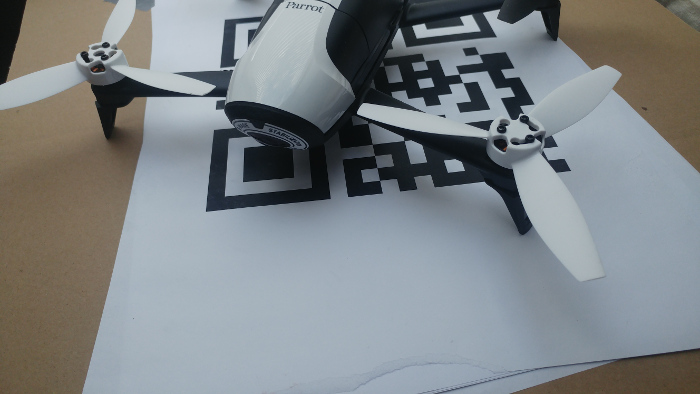
Drone Following Instructions
Image
Reading Instructions from QR Codes and Executing Them Using an Android Application Introduction Recently, I had the opportunity to build a drone prototype controlled by an Android device. The requirements were clear: the drone needed to be small in size and come with an SDK that supported video streaming. After some research, I decided that the Bebop 2 from Parrot was the best choice. Parrot is one of the few companies that offers an open SDK for developers, and they recently released the third version of their SDK. To get started, I worked with the Android application example provided by Parrot. This example covers almost every basic feature: connecting to the drone, moving it around, capturing high-quality photos, and accessing the drone’s media. One of the tasks for this prototype was to enable autonomous landing on a pattern. After researching existing solutions, I found a paper that explained the theory behind autonomous landing. This inspired me to create an Android applicatio...
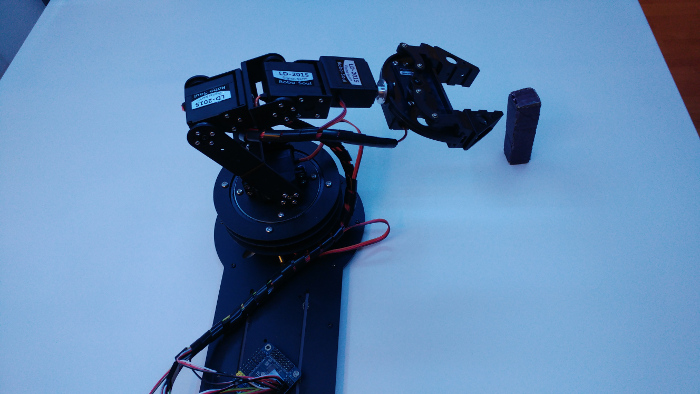
Robotic Arm with Computer Vision

Image
Robotic Arm with Computer Vision - Picking Up the Object Idea The main idea behind this project was to create an environment where a robotic arm can execute various commands based on image analysis of a scene. In this article, I will describe each part of the project in detail. For the first task, I focused on detecting and moving a single object. Environment The setup consists of several components assembled together. I used an old table as the base, repainting it white to provide better contrast with the objects. The robotic arm, which I purchased from eBay, is mounted on the middle of the longer side of the table. The arm has six servo motors, including a rotating base and claws at the other end. The parts are made of aluminum and are quite sturdy. Next, I cut and mounted perforated metal ledges to the corners of the table, securing everything together. I then attached an RGB LED strip to the bottom side of the top part of the structure. Finally, I placed a USB ca...

Counting dice and train wagons using computer vision

Image
Computer vision exercises with preprocessing Before starting my next project, I decided to work on some computer vision exercises. Each example is based on straightforward image preprocessing techniques. No complex data structures or machine learning are involved. Dice Detection I got this idea while browsing the net and became curious about how challenging it would be to write such a script. Here’s a step-by-step breakdown of the algorithm: Movement Detection : By comparing several frames with thresholds, we can determine if there is any movement in the frame. Adding a small time buffer after the movement stops gives us more accurate information. Removing the Background : Thresholding the grayscale frame helps to remove the background, leaving us with a binary image that highlights the objects. Cropping the Objects : Using contours, we can detect and isolate the objects by cropping them. Detecting Dots : By inverting the image, the dots on the dice become more distinguish...

Controlling an Owi Robotic Arm with Raspberry Pi Using Keyboard, WebSockets, and OpenCV

Image
How It All Started I recently received a Raspberry Pi (Model B+) as a gift for my 27th birthday. Naturally, the first thing I did was explore the GPIO (General Purpose Input/Output) pins that can be programmed. I quickly discovered the RPi.GPIO Python library, which supports GPIO manipulation, and I began experimenting with some basic circuits—toggling LEDs, working with an RGB LED, generating speaker beeps, and more. A few months earlier, a colleague had shown me a webpage featuring robotic arms that caught my attention. The closest retailer selling robotic arms was in the Czech Republic, and they only had one model available—the Owi robotic arm. So, I decided to get it and combine it with my Raspberry Pi. Connecting the Owi Arm to the Raspberry Pi The first challenge was connecting the Owi robotic arm to the Raspberry Pi. The model I purchased came with a joystick controller, so I had to figure out how to connect it to the Raspberry Pi. After a few hours of searching, I found a video...

Automatic Tool for Cropping Bills from Scans

Image
What Is It? At work, we’re developing a project aimed at small and medium-sized businesses that goes beyond simple accounting. It includes many innovative features, but today I want to focus on one in particular: the automatic processing of bills and invoices. Users can take advantage of this feature via a mobile client (Android, iOS) or a web application. The Challenge We encountered an issue where users were scanning multiple bills together in a single image, rather than following the "one image - one document" rule. This made it difficult to process the documents correctly. To address this, I developed a script that automatically detects and crops these multi-bill images into separate, individual images. The Algorithm To separate and crop the bills from a scanned image, I used a series of simple image preprocessing methods: Resize : The image is resized to a standard dimension for consistency. Morphological Operation (IMOPEN) : This step helps in removing noise and refinin...

Creating a Drill-Printing Robot with Android and leJOS

Image
Project Overview This project is an exciting fusion of Android development and robotics, combining an Android application with the LEGO NXT cube (v1.0) enhanced by the leJOS firmware. The result? A robot capable of drilling images, among other things! The project consists of two main components: Android Application : This app communicates with the NXT cube via Bluetooth, acting as a controller for various robotic functions. NXT Robot with leJOS Firmware : The NXT cube is upgraded with leJOS, allowing programming in Java, making it more versatile for complex tasks. Android Application The Android app isn't just for drilling images—it's a comprehensive controller for the NXT robot. Initially, it was designed as a multi-functional tool capable of: Controlling the robot’s movement using different programs, like line-following or accelerometer-based controls. Allowing the user to select the type of robot and the corresponding control programs. After pairing the app with the NXT cube...