Posts

Reviving an Old LED Screen: From Dust to Drum Visualizer

Image
A few years ago, I built a large LED screen out of empty toilet paper rolls. It was a fun DIY project controlled by an Android app, and I even wrote an article about it. But after some time, the screen ended up unused, just sitting around collecting dust. When I recently decided to check it out, I found that some of the LEDs were no longer working. I was ready to toss it out, but then an idea hit me. The Drum Set and the Spark of an Idea Last Christmas, we welcomed a new addition to our home—a drum set (Alesis Drums Nitro Mesh Kit). While setting it up and exploring its features, I noticed that it supported MIDI output, and I realized that my old LED screen could be repurposed as a visualizer for the drum set. This would not only breathe new life into the screen but also enhance the drumming experience with dynamic light displays. Upgrading the LED Screen The first step was to replace the non-functioning LEDs. I decided to upgrade to RGB LEDs this time, allowing for a broader range of...
DIY Android App for Yi Dash Car Camera

Image
Why A friend asked me to develop an Android app for his new Yi Dash Car Camera . The camera has impressive specifications at a very low price. He showed me the native Android app available on Google Play but needed a way to download and search video files by specific timestamps. About the Camera The camera operates on its own Wi-Fi network. To interact with it, you must be connected to this Wi-Fi. It automatically records videos, each approximately 3 minutes long, when powered on. Recording stops during downloads or settings changes. The official app also allows you to take a picture, which is essentially a screenshot from the video stream. What I Did Initially, I tried using an SDK from the camera's manufacturer, but it did not support this model. After contacting support, I learned that this camera lacks an official SDK. I then downloaded their app and examined the source code using an online decompiler , which was not obfuscated. Despite this, navigating the source code was ti...

Toilet Roll Light Wall

Image
LED Screen Made of Empty Toilet Rolls Why? The initial idea was to find a creative way to reuse empty toilet rolls while having some fun with Arduino and LEDs. I started by gluing together the first block, consisting of 4x3 LEDs connected to an Arduino Nano. As the project progressed, I thought it would be interesting to control the LED screen directly from an Android device. To make this possible, I added a Bluetooth adapter and developed a  Android app. As time passed and more empty toilet rolls became available, I continued building one block after another. Eventually, I set a goal to create a 4x4 grid of blocks, totaling 192 LEDs. As I expanded the physical screen, I also enhanced the functionality of the Android app, adding new features to control the growing display. first 6 blocks What Can It Do? Since the video below demonstrates it clearly, I'll just briefly list the features of the Android app: Draw (real-time): Allows real-time drawing on the LED screen. Toggle Ra...

Drone Following Instructions

Image
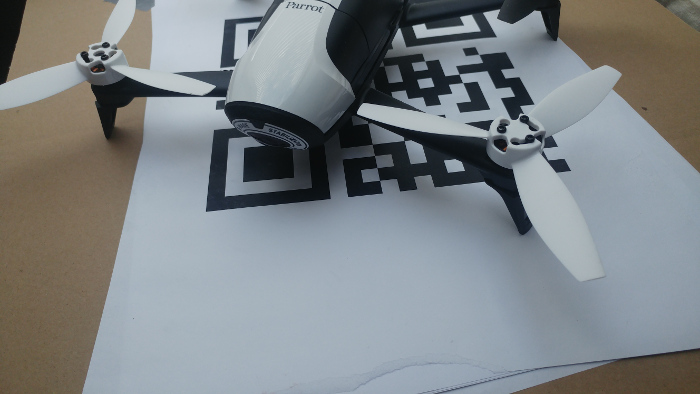
Reading Instructions from QR Codes and Executing Them Using an Android Application Introduction Recently, I had the opportunity to build a drone prototype controlled by an Android device. The requirements were clear: the drone needed to be small in size and come with an SDK that supported video streaming. After some research, I decided that the Bebop 2 from Parrot was the best choice. Parrot is one of the few companies that offers an open SDK for developers, and they recently released the third version of their SDK. To get started, I worked with the Android application example provided by Parrot. This example covers almost every basic feature: connecting to the drone, moving it around, capturing high-quality photos, and accessing the drone’s media. One of the tasks for this prototype was to enable autonomous landing on a pattern. After researching existing solutions, I found a paper that explained the theory behind autonomous landing. This inspired me to create an Android applicatio...

Robotic Arm with Computer Vision

Image
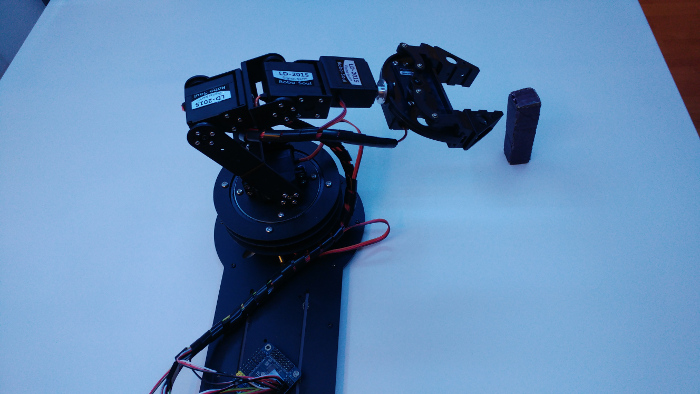
Robotic Arm with Computer Vision - Picking Up the Object Idea The main idea behind this project was to create an environment where a robotic arm can execute various commands based on image analysis of a scene. In this article, I will describe each part of the project in detail. For the first task, I focused on detecting and moving a single object. Environment The setup consists of several components assembled together. I used an old table as the base, repainting it white to provide better contrast with the objects. The robotic arm, which I purchased from eBay, is mounted on the middle of the longer side of the table. The arm has six servo motors, including a rotating base and claws at the other end. The parts are made of aluminum and are quite sturdy. Next, I cut and mounted perforated metal ledges to the corners of the table, securing everything together. I then attached an RGB LED strip to the bottom side of the top part of the structure. Finally, I placed a USB ca...

Counting dice and train wagons using computer vision

Image
Computer vision exercises with preprocessing Before starting my next project, I decided to work on some computer vision exercises. Each example is based on straightforward image preprocessing techniques. No complex data structures or machine learning are involved. Dice Detection I got this idea while browsing the net and became curious about how challenging it would be to write such a script. Here’s a step-by-step breakdown of the algorithm: Movement Detection : By comparing several frames with thresholds, we can determine if there is any movement in the frame. Adding a small time buffer after the movement stops gives us more accurate information. Removing the Background : Thresholding the grayscale frame helps to remove the background, leaving us with a binary image that highlights the objects. Cropping the Objects : Using contours, we can detect and isolate the objects by cropping them. Detecting Dots : By inverting the image, the dots on the dice become more distinguish...

Play table

Image
Using proximity sensors for playing midi tones combined with LED visualization Description The goal of this project was to create a table-sized device equipped with multiple proximity sensors capable of playing MIDI tones. Each sensor is accompanied by LEDs that indicate the distance of the user's hand above the table. This interactive table can be used by one or more people simultaneously. Hardware Setup I began with a cardboard prototype to test the sensors and the underlying logic. Afterward, I ordered a custom plottered sticker with a design which was painted with bare conductive paint. I drilled holes and connected the touchboard to seven Arduino Nanos, each controlling 13 LEDs. Additionally, I incorporated two potentiometers: one for volume control and another for changing the note setup. Programming The programming task was divided into two parts: Master Program (Touchboard): Reads values from the proximity sensors and sends messages to the slave Arduinos. Sl...