Posts

Showing posts with the label android

Skate Tricks Recognition Using Gyroscope

Image
In this article, we’ll describe how to recognize skateboard tricks using a gyroscope. This sensor is already present in most smartphones, but if you’re not familiar with it, here is a description . Before we dive in, a small disclaimer: This project originated as part of a Slido hackathon with the goal of demonstrating that it’s possible to recognize skateboard tricks using a gyroscope. For simplicity, we’ll focus on recognizing just two basic tricks and won’t consider the skater’s stance on the board. We’ll break down the problem into several smaller tasks: recording the trick, storing the data, describing the trick, analyzing it, and, finally, recognizing it. Recording the Trick Let’s start with trick recording. To obtain precise data, the device with the gyroscope needs to be attached directly to the skateboard. Place it on the bottom of the board to avoid interfering with the execution of the trick. The device should also be compact and lightweight to avoid altering the board’s cen...
DIY Android App for Yi Dash Car Camera

Image
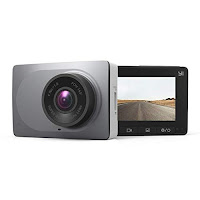
Why A friend asked me to develop an Android app for his new Yi Dash Car Camera . The camera has impressive specifications at a very low price. He showed me the native Android app available on Google Play but needed a way to download and search video files by specific timestamps. About the Camera The camera operates on its own Wi-Fi network. To interact with it, you must be connected to this Wi-Fi. It automatically records videos, each approximately 3 minutes long, when powered on. Recording stops during downloads or settings changes. The official app also allows you to take a picture, which is essentially a screenshot from the video stream. What I Did Initially, I tried using an SDK from the camera's manufacturer, but it did not support this model. After contacting support, I learned that this camera lacks an official SDK. I then downloaded their app and examined the source code using an online decompiler , which was not obfuscated. Despite this, navigating the source code was ti...

Toilet Roll Light Wall

Image
LED Screen Made of Empty Toilet Rolls Why? The initial idea was to find a creative way to reuse empty toilet rolls while having some fun with Arduino and LEDs. I started by gluing together the first block, consisting of 4x3 LEDs connected to an Arduino Nano. As the project progressed, I thought it would be interesting to control the LED screen directly from an Android device. To make this possible, I added a Bluetooth adapter and developed a  Android app. As time passed and more empty toilet rolls became available, I continued building one block after another. Eventually, I set a goal to create a 4x4 grid of blocks, totaling 192 LEDs. As I expanded the physical screen, I also enhanced the functionality of the Android app, adding new features to control the growing display. first 6 blocks What Can It Do? Since the video below demonstrates it clearly, I'll just briefly list the features of the Android app: Draw (real-time): Allows real-time drawing on the LED screen. Toggle Ra...

Drone Following Instructions

Image
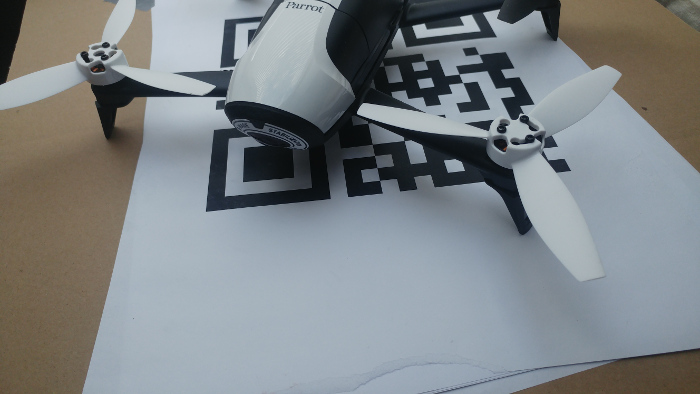
Reading Instructions from QR Codes and Executing Them Using an Android Application Introduction Recently, I had the opportunity to build a drone prototype controlled by an Android device. The requirements were clear: the drone needed to be small in size and come with an SDK that supported video streaming. After some research, I decided that the Bebop 2 from Parrot was the best choice. Parrot is one of the few companies that offers an open SDK for developers, and they recently released the third version of their SDK. To get started, I worked with the Android application example provided by Parrot. This example covers almost every basic feature: connecting to the drone, moving it around, capturing high-quality photos, and accessing the drone’s media. One of the tasks for this prototype was to enable autonomous landing on a pattern. After researching existing solutions, I found a paper that explained the theory behind autonomous landing. This inspired me to create an Android applicatio...

Creating Fake SMS with Android

Image
I was curious about how challenging it would be to create fake SMS messages, so I decided to make a small research. I came across a straightforward app that allows users to create fake SMS messages. The app's interface is user-friendly, letting you set the message type, date, and time. However, to use this app, you need to set it as the default messaging application. At this point, I was confident that it was possible to achieve this without root permissions. Initial Exploration My first approach was to send a fake intent to simulate a new SMS arrival. Despite my efforts, this method didn’t work. Many sources suggested using the android.provider.Telephony.SMS_DELIVER intent action, which is the system intent action for broadcasting SMS. However, starting from Android 4.4 (KitKat), only the default messaging app can receive this intent, and broadcasting it is restricted to system applications. Additionally, permissions for reading and writing SMS are restricted to the default messa...

Self playable game on smartphone

Image
Hardware I recently assembled a Lego phone holder that rotates along the Y-axis (the longer side of the phone). The holder's end is attached to a servo motor, which is connected to an Android smartphone via USB OTG through a motor module. This motor module can control up to 24 servo motors and operates at 5 volts. Software The motor module has its own built-in protocol, which handles rotation and speed, with parameters separated by newline characters. The second part of the project involved developing an Android application to communicate with the servo module using this serial protocol. I based the application on an example of USB serial communication with Arduino, adapting it to work with my device. Game For this project, I chose a game I developed about a year ago. It's a simple game where the accelerometer controls a rocket that must navigate through gates. Tilting the device left or right adjusts the rocket's position, and the goal is to pass through as many gates as p...

Sms Grocery List

Image
Widget with Grocery List Created from Received Messages Why? I often found myself with messages containing shopping lists that I wanted to keep track of while heading home. My initial idea was to create an invisible app that would read incoming messages and automatically add their content to Google Keep, displaying it in a widget. However, I discovered that Google Keep does not offer an API for third-party integration. As a result, I decided to develop an app with this functionality. What Did I Do? The application includes a receiver that captures all new messages. Once a message is received, the app scans for predefined keywords. You can configure multiple keywords to search for in incoming messages. Additionally, the app allows you to set up reminders, which will trigger notifications at a specific time of day when at least one message has been received. These settings can be found in the app's side menu under "Settings." The second key feature of the application is its...

Exploring Development for the Sony SmartWatch: First Edition

Image
Introduction In this post, we'll delve into the development for the first model of Sony Smart Watches. While the third edition is currently available, I recently had the chance to experiment with the original model. I picked up two Smart Watches at a local flea market for just 3 EUR each. However, they came without an adapter or wrist strap. Sony’s proprietary cable presented a challenge, but I managed to made my own using old USB cables. For anyone facing a similar issue, you only need two of the four pins on the cable: VCC (power) and ground. Setup Unlike common Android devices, there isn't a universal SDK for smartwatches. Each manufacturer provides their own SDK. To use official apps, you first need to install the "Smart Connect" app, which allows you to pair your watch with your device. After installation, you can download apps from the Google Play Store. Note that these apps won’t appear in the app list on the watch because they don't contain a runnable Acti...

Detecting Changes in Android Contacts

Introduction In this post, we'll explore how to detect changes in Android contacts. Android OS provides a mechanism for contact storage known as the Contacts Provider. This provider offers a structured set of data and a standard interface that connects data across different processes. Structure of Android Contacts ContactsRaw Table _id : RAW_CONTACT_ID account_name : e.g., email address account_type : e.g., com.google.com deleted : Indicates if the contact is deleted The ContactsContract.RawContacts.CONTENT_URI table contains original contacts, mainly storing RAW_CONTACT_ID . Contact details are stored in the ContactsContract.Data table. Contacts Table _id : CONTACT_ID (refers to a group of RAW_CONTACT_ID s) lookup : Provides a link to all contact details in this table The Contacts.CONTENT_URI table groups RawContacts based on merging rules. If a raw contact can't be grouped with an existing contact, a new contact is created. The LOOKUP_KEY is a permanent link to a conta...

Comparing Facebook and Google+ Login Integration for Android Apps

Recently, I had the opportunity to implement Facebook and Google+ login functionalities into an Android application. I decided to write a brief comparison of the two integration processes using Facebook SDK v4.3 and Google Play Services v4.3.23. Google+ Server-Side Setup : Requires creating a new app on the Google Developers Console. Android Manifest : You need to add the generated API key into the Android manifest file. Implementation : Involves a few methods. Your activity needs to implement ConnectionCallbacks and OnConnectionFailedListener . Facebook Server-Side Setup : Also requires creating a new app on the Facebook Developers site. Android Manifest : You need to add the generated API key to the Android manifest and declare one activity. SDK Compatibility : The SDK is not compatible with Eclipse directly; however, there are workarounds available on Stack Overflow. XML Customization : Customizing the Facebook button in XML requires overwriting styles in the Facebook SDK, which is...

Using the LG G3 Circle Case SDK to Create a Demo Application

Image
What is the Circle Case? LG offers a unique accessory for its G3 model—a special case with several advanced features. This case supports NFC technology, wireless charging via the Qi standard (available in the European market), and includes a circular cutout on the front cover. This circular window allows users to interact with about one-third of the display using a customized GUI, providing quick access to certain apps and functions. LG G3 SDK To help developers leverage the circle case's features, LG released a lightweight SDK. The core functionality revolves around detecting the opening and closing of the case using a hidden magnet within the case and a sensor behind the screen. The SDK provides a broadcast receiver to capture these events. Here's a basic example of how you can use this in your app: public class QCircleActivity extends Activity { // [START]declared in LGIntent.java of LG Framework public static final int EXTRA_ACCESSORY_COVER_OPENED = 0; public s...

Generating a Heat Map Using iBeacons with an Android Application

Image
Introduction About a month ago, I had the opportunity to experiment with iBeacons on the Android platform. My initial task was to implement a proximity trigger for one of our Android apps at work. As we delved deeper into the project, we became curious about obtaining more precise data, such as generating a heat map. Searching for Solutions I began by searching for existing projects and apps that could generate a heat map based on actual distances from iBeacons. Unfortunately, I couldn’t find a precise solution in the Play Store. After visualizing the raw accuracy data on a graph (as shown in the image below), I discovered a helpful page that confirmed some of my findings. Here are my key observations: The raw data from iBeacons is not as accurate as I initially expected. Accuracy varies depending on the orientation of the iBeacon relative to the smartphone. Beyond a certain distance, the margin of error increases significantly. For more precise data, you need to set the transmit inter...

Creating a Drill-Printing Robot with Android and leJOS

Image
Project Overview This project is an exciting fusion of Android development and robotics, combining an Android application with the LEGO NXT cube (v1.0) enhanced by the leJOS firmware. The result? A robot capable of drilling images, among other things! The project consists of two main components: Android Application : This app communicates with the NXT cube via Bluetooth, acting as a controller for various robotic functions. NXT Robot with leJOS Firmware : The NXT cube is upgraded with leJOS, allowing programming in Java, making it more versatile for complex tasks. Android Application The Android app isn't just for drilling images—it's a comprehensive controller for the NXT robot. Initially, it was designed as a multi-functional tool capable of: Controlling the robot’s movement using different programs, like line-following or accelerometer-based controls. Allowing the user to select the type of robot and the corresponding control programs. After pairing the app with the NXT cube...